AnswerVault for Teams

Your organisation's knowledge, available directly in Microsoft Teams

Ask questions where you already work

No more switching between apps to find information. Mention @AnswerVault in any Teams channel or chat, ask your question in plain English, and get an accurate answer with source citations — all without leaving Teams.
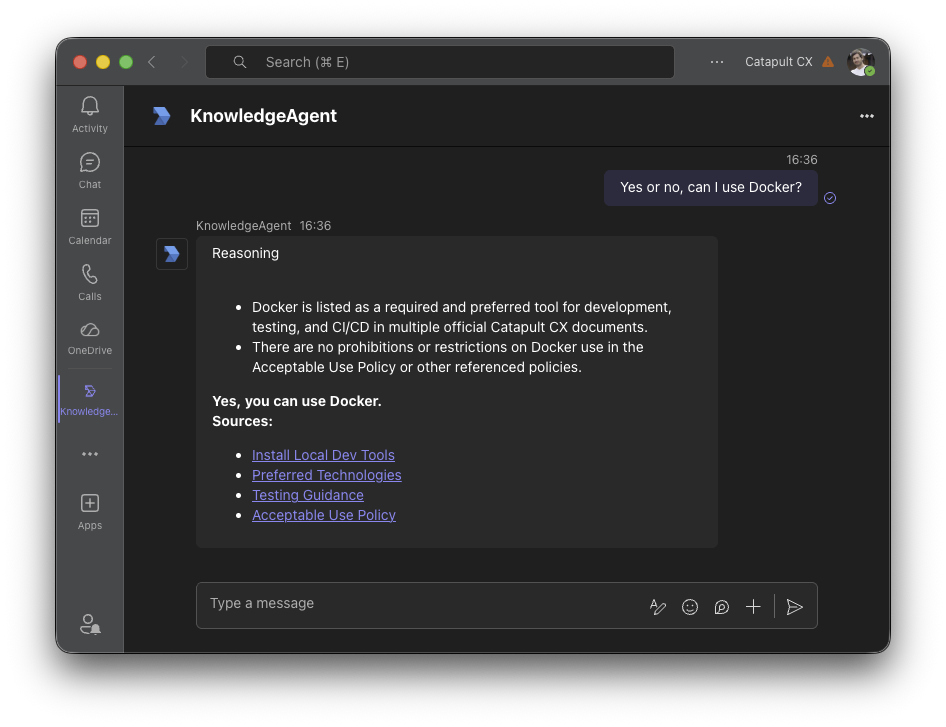
AnswerVault answering a question in Microsoft Teams with source citations

Channels and chats

Ask questions in any channel or direct message. The whole team benefits from shared answers.

Cited answers

Every answer includes links to the source documents so you can verify and dig deeper.

Secure

Respects your existing permissions. Users only get answers from documents they have access to.

How it works

1

Install the bot

Add AnswerVault to your Teams workspace from Settings. One-click install, no IT ticket needed.

2

Mention @AnswerVault

In any channel or chat, mention the bot followed by your question in plain English.

3

Get your answer

Receive an accurate, cited answer drawn from your connected knowledge sources — in seconds.

Use cases

IT helpdesk

"How do I connect to the VPN?" — deflect common questions before they become tickets.

New starter onboarding

"Where's the expenses policy?" — new joiners get answers instantly instead of asking around.

Project teams

"What did we agree in the last review?" — find decisions buried in meeting notes and docs.

Customer-facing teams

"What's our SLA for enterprise clients?" — get the right answer while you're on the call.

Ready to bring knowledge into Teams?

Start free today, no credit card required. Available on Pro, Business and Enterprise tiers.